

If you have ever searched for ways to create a website, start a blog, or build an online store, you have probably come across WordPress.
But what exactly is WordPress, and why do so many websites use it?
WordPress is an open-source content management system, commonly called a CMS, that allows you to create and manage websites without having to build everything from scratch. You can use it to create anything from a simple personal blog to a business website, portfolio, membership platform, news publication, or online store.
One of the biggest reasons behind WordPress’s popularity is its flexibility. You can control the appearance of your website using themes and add new functionality using plugins.
In this beginner-friendly guide, you will learn what WordPress is, how it works, what you can create with it, and whether it is the right platform for your website.
What Is WordPress?
WordPress is free, open-source software used to create and manage websites.
In technical terms, WordPress is a content management system. A CMS provides an interface through which website owners can create, edit, organize, and publish content without manually coding every webpage.
Instead of writing HTML every time you want to publish an article, for example, WordPress gives you a visual administration area where you can create content using an editor.
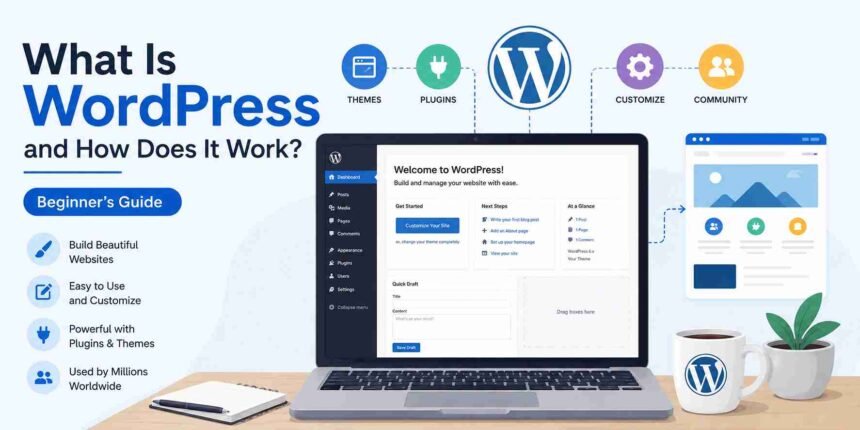
After installing WordPress, you get access to a dashboard from which you can manage major parts of your website, including:
- Posts
- Pages
- Images and other media
- Comments
- Themes
- Plugins
- Users
- Website settings
This makes website management significantly more accessible to people who are not professional web developers.
However, WordPress is not limited to beginners. Developers can also customize its code, build custom themes and plugins, and use its APIs to create more complex websites and applications.
A Brief History of WordPress
WordPress was launched in 2003 as a publishing platform created from a fork of an earlier project called b2/cafelog.
It initially became popular as a blogging platform, but it has evolved far beyond blogging.
Today, WordPress can power blogs, company websites, online stores, membership platforms, publications, portfolios, educational websites, and many other types of online projects.
The WordPress project remains open source, meaning its underlying software can be used, studied, modified, and contributed to by its global community.
How Does WordPress Work?
When someone visits a WordPress website, several components work together behind the scenes to display the page they requested.
For beginners, you can think of a WordPress website as having five major building blocks.
1. Web Hosting Stores Your Website

A WordPress website needs a server where its files and data can be stored.
A web hosting provider gives you space and computing resources on a server connected to the internet.
The WordPress software is installed in this hosting environment.
2. The Database Stores Your Content and Settings

Much of your website’s information is stored in a database.
This can include your:
- Posts
- Pages
- Comments
- User information
- Website settings
- Plugin settings
When a visitor requests a page, WordPress retrieves the required information and uses it to generate the page.
3. Themes Control the Website’s Appearance

A WordPress theme determines much of how your website looks and is presented.
Depending on the type of theme you use, it can control elements such as:
- Layout
- Typography
- Colors
- Headers
- Footers
- Templates
- Blog layouts
Modern block themes can also allow you to customize major areas of your website through WordPress’s Site Editor.
Changing a theme can significantly alter your website’s appearance without deleting your posts and pages.
4. Plugins Add Features

Plugins extend what WordPress can do.
For example, you might install a plugin to add:
- Contact forms
- SEO functionality
- Security features
- Backups
- Caching
- Membership functionality
- E-commerce features
This plugin system is one of WordPress’s biggest strengths because website owners can add functionality without developing every feature themselves.
However, plugins should still be selected carefully. Installing unnecessary, outdated, or poorly maintained plugins can create performance, compatibility, and security problems.
5. The WordPress Dashboard Lets You Manage Everything

The WordPress dashboard is the administration area of your website.
From the dashboard, you can create content, upload images, install themes, manage plugins, add users, moderate comments, and change website settings.
The exact dashboard menus you see can vary depending on your theme, plugins, permissions, and WordPress configuration.
We will explore every major dashboard section in detail in our dedicated WordPress Dashboard tutorial.
What Can You Build with WordPress?
WordPress can be used to create many different types of websites.
1. Blogs
WordPress began as a blogging platform and still includes powerful publishing features for creating posts, categories, tags, authors, and archives.
2. Business Website
Businesses can use WordPress to create professional websites containing service pages, contact information, company profiles, forms, landing pages, and other business content.
3. Online Stores
WordPress can be extended with e-commerce functionality to sell physical products, digital products, subscriptions, and other items online.
4. Portfolio Websites
Photographers, designers, writers, developers, and other professionals can use WordPress to showcase their work.
5. News and Magazine
WordPress’s publishing and user-management features make it suitable for websites that regularly publish large amounts of content.
6. Membership Websites
With the appropriate setup, WordPress can be used to restrict content, manage members, and create subscription-based websites.
7. Online Courses
WordPress can also be extended with learning management functionality for publishing courses, lessons, quizzes, and other educational content.
The important point is that WordPress itself provides the foundation. Themes, plugins, custom development, and hosting infrastructure determine how far that foundation can be extended.
Is WordPress Free?
Yes, the open-source WordPress software available through WordPress.org is free to download and use.
However, running a WordPress website is not necessarily completely free.
For a typical self-hosted website, you may need to pay for:
- A domain name
- Web hosting
- Premium themes, if required
- Premium plugins, if required
- Development or maintenance services, if required
You can build a website using free themes and plugins, but you will generally still need hosting and a domain if you want to operate an independent public website.
Therefore, it is more accurate to say:
WordPress software is free, but operating a WordPress website can involve additional costs.
What Is the Difference Between WordPress.org and WordPress.com?

This is one of the most common sources of confusion for beginners.
WordPress.org is the home of the open-source WordPress software and its broader project resources.
When people refer to a “self-hosted WordPress website,” they generally mean using the open-source WordPress software with a hosting environment of their choice.
WordPress.com, meanwhile, is a managed hosting service built around WordPress.
Both use WordPress technology, but the way hosting, management, pricing, and certain features are provided can differ.
This distinction deserves more than a few paragraphs, so we will cover it in detail in our next guide: WordPress.com vs WordPress.org: What’s the Difference?
Do You Need Coding Skills to Use WordPress?
No. You do not need to know how to code to create and manage a basic WordPress website.
WordPress provides visual tools for many common tasks, including:
- Creating pages
- Writing posts
- Adding images
- Building navigation
- Changing designs
- Installing plugins
- Managing website settings
Many themes and plugins also provide visual interfaces for customization.
However, learning basic HTML, CSS, PHP, and JavaScript can become useful if you want deeper control over your website.
Think of coding as an optional power tool rather than an entry ticket.
You can start without it and learn technical skills gradually as your needs become more advanced.
What Are WordPress Themes?

A WordPress theme provides the presentation layer for your website.
Themes can influence your site’s overall design, layouts, typography, templates, and other visual elements.
WordPress supports different approaches to themes, including modern block themes that work with the Site Editor and traditional themes that may provide different customization interfaces.
You can find free themes through the official WordPress ecosystem, purchase premium themes, or develop a custom theme.
Later in this series, we will show you exactly how to install and customize a WordPress theme.
What Are WordPress Plugins?
Plugins are software packages that add or modify functionality in WordPress.
For example, if your website does not have a particular feature by default, there may be a plugin that can add it.
Plugins can be used for tasks such as:
- Creating forms
- Improving SEO workflows
- Adding security features
- Creating backups
- Optimizing performance
- Building online stores
- Adding membership functionality
WordPress has a large ecosystem of free and commercial plugins.
That flexibility is powerful, but more plugins do not automatically mean a better website. Each plugin should solve a genuine requirement and come from a trustworthy, actively maintained source.
Is WordPress Good for Beginners?
WordPress can be an excellent option for beginners who want flexibility and room to grow.
You can start by learning a handful of basic concepts:
- How to use the WordPress dashboard
- How to create posts and pages
- How themes work
- How plugins work
- How to manage basic settings
Once you understand these concepts, most everyday WordPress tasks become considerably easier.
There is still a learning curve, particularly when you encounter hosting settings, performance optimization, security, or technical errors.
That is exactly where a structured tutorial library becomes useful.
What Are the Advantages of WordPress?
Some of the main advantages of WordPress include:
- Free and Open Source
The core WordPress software can be downloaded and used without purchasing a software license. - Free and Open Source
The core WordPress software can be downloaded and used without purchasing a software license. - Flexible
WordPress can be adapted to many different types of websites. - Large Theme and Plugin Ecosystem
Themes and plugins allow website owners to customize appearance and functionality. - Content Management Tools
WordPress provides built-in tools for creating and organizing posts, pages, media, users, and other content. - Beginner-Friendly Entry Point
Many common website-management tasks can be completed without writing code. - Developer Friendly
Developers can extend WordPress through custom code, themes, plugins, APIs, hooks, and other development tools. - Large Community
Because WordPress has a large global community, users can access extensive documentation, learning materials, community forums, events, and third-party educational resources.
Are There Any Disadvantages to WordPress?
WordPress is powerful, but it is not completely maintenance-free.
Depending on how your website is set up, you may need to manage:
- Software updates
- Plugin compatibility
- Theme updates
- Backups
- Website security
- Performance
- Hosting
- Technical problems
A poorly maintained WordPress website can become slow, unstable, or vulnerable.
This is why learning how WordPress works is more valuable than simply learning how to click the Publish button.
WordPress vs a Traditional Website

WordPress is not an alternative to having a website. It is one way of building and managing a website.
A completely custom-coded website may require a developer to manually create or update functionality.
WordPress provides a content management layer that makes many everyday tasks accessible through an administration interface.
Developers can still work with the underlying code when deeper customization is required.
This combination of usability and extensibility is one reason WordPress can serve both beginners and professional developers.
Who Should Use WordPress?
WordPress may be a good choice if you want to create:
- A personal blog
- A professional website
- A small business website
- An online publication
- A portfolio
- An online store
- A membership website
- An educational website
Whether it is the best choice depends on your requirements, technical resources, budget, and how much control you want over your website.
How Do You Start Using WordPress?
For a typical self-hosted WordPress website, the process looks something like this:
- Step 1: Choose and register a domain name.
- Step 2: Choose a suitable web hosting provider.
- Step 3: Install WordPress.
- Step 4: Log in to the WordPress dashboard.
- Step 5: Configure your basic website settings.
- Step 6: Choose and customize a theme.
- Step 7: Install only the plugins your website needs.
- Step 8: Create your important pages and content.
- Step 9: Configure security, backups, and performance.
- Step 10: Test your website before launching it publicly.
Don’t worry if some of these steps sound unfamiliar. We will cover each one individually throughout this WordPress tutorial series.
Frequently Asked Questions About WordPress
What is WordPress in simple terms?
WordPress is software that helps you create, publish, and manage a website through an administration interface instead of manually coding every page.
Is WordPress only for blogs?
No. Although WordPress has strong roots in blogging, it can be used for business websites, portfolios, online stores, publications, membership sites, educational platforms, and many other projects.
Is WordPress free to use?
The open-source WordPress software is free. However, running a self-hosted public website generally involves expenses such as hosting and a domain name.
Can I use WordPress without knowing how to code?
Yes. Many WordPress websites can be created and managed without coding knowledge. Coding becomes useful when you need more advanced customization or development.
Is WordPress.org the same as WordPress.com?
No. WordPress.org is the home of the open-source WordPress project and software, while WordPress.com is a managed hosting service built around WordPress. The differences will be explained in detail in our dedicated comparison.
Can WordPress be used for an online store?
Yes. WordPress can be extended with e-commerce functionality to create and manage online stores.
Is WordPress suitable for professional websites?
Yes. WordPress can support projects ranging from small websites to large publishing and enterprise implementations. The suitability of a particular setup depends on its hosting, architecture, maintenance, and technical requirements.
Final Thoughts
WordPress is much more than a blogging tool. It is a flexible content management system that gives beginners accessible tools for building websites while also providing developers with extensive customization possibilities.
Its combination of open-source software, themes, plugins, content-management features, and a large community has helped make it one of the most widely used website platforms.
If you are completely new to WordPress, understanding the platform itself is only the first step.
The next question most beginners encounter is surprisingly confusing: Should you use WordPress.org or WordPress.com?
That is exactly what we will answer in the next tutorial.


