
Facebook Caption Generator
Create engaging, high-quality Facebook captions instantly. Choose your tone, audience, and style — generate scroll-stopping posts in seconds.
📋 Your Captions
Facebook Caption Generator (Free Tool) – Create Viral, Engaging Captions Instantly
Struggling to write the perfect Facebook caption that grabs attention and drives engagement? You’re not alone. Crafting engaging captions consistently can be time-consuming and mentally exhausting—especially when you’re managing a brand, page, or personal profile.
That’s where our Facebook Caption Generator comes in.
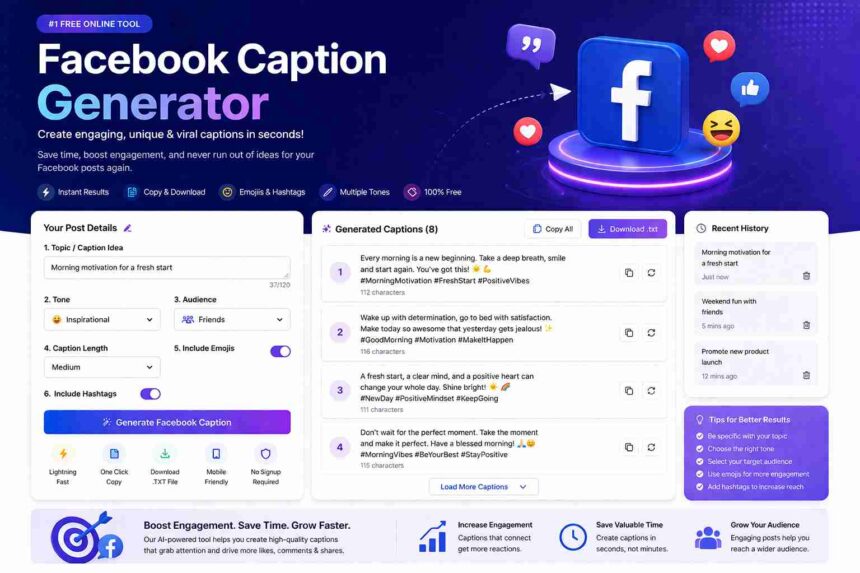
This powerful, free online tool helps you create high-converting, engaging, and creative Facebook captions in seconds. Whether you’re posting for business, personal branding, or fun, this tool is designed to save your time and boost your reach.
Why Use Our Facebook Caption Generator?
Crafting the perfect Facebook caption can be the difference between a post that gets scrolled past and one that sparks engagement. Our free Facebook Caption Generator helps you create compelling, share-worthy captions tailored to your unique needs.
How It Works
- Enter your topic or caption idea to get started
- Select your preferred tone — from funny to professional
- Choose your target audience for optimized messaging
- Toggle emojis and hashtags for maximum reach
- Generate multiple unique captions instantly
Key Features of This Tool
- ✅ Generate 5–10 captions instantly
- ✅ Multiple tones (Funny, Professional, Emotional, etc.)
- ✅ Emoji & hashtag support
- ✅ Copy captions with one click
- ✅ Download captions as a file
- ✅ Fully responsive (mobile-friendly)
- ✅ No login required
- ✅ Lightning-fast performance
Why Facebook Captions Matter?
A strong caption can:
- Increase post engagement (likes, comments, shares)
- Improve reach through algorithm signals
- Build emotional connection with your audience
- Drive traffic and conversions
Without a good caption, even great content can go unnoticed.
Who Should Use This Tool?
This tool is perfect for:
- Social media managers
- Digital marketers
- Influencers
- Business owners
- Bloggers
- Students
Anyone posting on Facebook
How to Use the Facebook Caption Generator?
Follow these simple steps:
- Enter your topic or idea
- Select your preferred tone
- Choose audience type
- Set caption length
- Enable emojis/hashtags (optional)
- Click “Generate Facebook Caption”
- Copy or download your favorite captions
Tips for Writing Better Facebook Captions
Even with a generator, these tips can help:
- Keep it conversational and relatable
- Use emojis strategically
- Ask questions to boost engagement
- Keep it short but impactful
- Add a call-to-action (CTA)
- Use trending hashtags
🆓 Is This Tool Free?
Yes! This Facebook Caption Generator is 100% free to use, with no hidden charges or login required.
Tips for Great Facebook Captions
The best Facebook captions are authentic, concise, and include a clear call-to-action. Use questions to encourage comments, emojis to add personality, and relevant hashtags to extend your reach beyond your existing followers.
Frequently Asked Questions
| 1. What is a Facebook Caption Generator? |
|---|
| A Facebook Caption Generator is a tool that automatically creates captions for your posts based on your input. |
| 2. Is this tool free to use? |
| Yes, it is completely free with no subscription required. |
| 3. Can I use these captions for business pages? |
| Absolutely! The tool is designed for both personal and business use. |
| 4. Does it generate unique captions every time? |
| Yes, it uses dynamic logic and variations to create unique captions. |
| 5. Can I include emojis in captions? |
| Yes, you can enable or disable emojis as per your preference. |
| 6. Are hashtags included? |
| Yes, hashtags can be added optionally. |
| 7. Is this tool mobile-friendly? |
| Yes, it is fully responsive and works on all devices. |
| 8. Do I need to sign up? |
| No signup or login is required. |
| 9. Can I download captions? |
| Yes, you can download all generated captions as a text file. |
| 10. How many captions can I generate at once? |
| You can generate multiple captions (typically 5–10) in one click. |
| 11. Is it better than writing captions manually? |
| It saves time and provides creative ideas, but you can always customize outputs further. |
| 12. Can I use it for other social media platforms? |
| Yes, the captions can be adapted for Instagram, LinkedIn, etc. |
More Facebook Tools for you
| Facebook Monetization Eligibility Checker | Facebook Video Downloader |
|---|---|
| Facebook Reels Downloader | Facebook Stylish Text Generator |
| Facebook Bio Generator | Facebook Caption Generator |
| Facebook Hashtag Generator | Profile Picture Resizer |
| Cover Photo Size Tool | Emoji Generator |
| Username Generator | Page Name Generator |
| Group Name Generator | Engagement Calculator |
| Ad Copy Generator | Fake Chat Generator |
| Comment Screenshot Generator | Profile Frame Maker |