

In the world of blogging, your theme is more than just a coat of paint — it shapes user experience, influences search engine rankings, determines page load speed, and ultimately affects how long visitors stick around. With Blogger (Blogspot) still serving millions of content creators worldwide, choosing the right theme for the platform can make a significant difference in your blog’s success.
Enter Freebify — a name that has steadily gained traction among Blogger users looking for a professional, feature-rich, and fast-loading template without breaking the bank.
In this in-depth technical review, we take a close look at the Freebify Blogger theme across four critical dimensions: Design & Aesthetics, SEO & Performance, Customization Options, and Mobile Responsiveness. Whether you’re a solo blogger, a content creator running a tutorial site, or someone distributing digital resources like mockups, vectors, fonts, or free templates — this review will help you decide if Freebify is the right fit.
Who Is Freebify Best Suited For?
Freebify is ideal for:
- Tutorial and how-to blogs
- Design resource sites (fonts, mockups, vectors, templates)
- Tech and news magazine-style blogs
- AdSense-monetized blogs that need strategic ad placement
- Bloggers who want a professional look without hiring a developer
What This Review Covers
This review tests Freebify across desktop and mobile devices, inspects its code quality, evaluates built-in SEO features, and assesses how easy it is for both beginners and advanced users to customize.
2. First Impressions & Overview
From the moment you load a Freebify-powered blog, one thing is immediately clear — this is not your average Blogger template. It exudes a clean, modern, and professional aesthetic that feels more at home with premium WordPress themes than with the typical free Blogspot template.
Freebify positions itself as a lightweight, retina-ready, and highly customizable magazine-style Blogger template. Built on HTML5 foundations, it targets bloggers who want speed, visual polish, and flexibility — all in one package.
The theme is available in both Free and Premium versions:
| Feature | Free Version | Premium Version |
|---|---|---|
| Responsive Design | ✅ | ✅ |
| Basic Customization | ✅ | ✅ |
| Dark Mode | ❌ | ✅ |
| Schema Markup (SEO) | Limited | Full |
| RTL Language Support | ❌ | ✅ |
| Table of Contents | ❌ | ✅ |
| Advanced Ad Sections | Limited | ✅ |
| Priority Support | ❌ | ✅ |
| Lifetime Updates | ❌ | ✅ |
The premium version is available for $9.95 on Gumroad, making it an extremely affordable investment for serious bloggers. For most content creators who want the full feature set, the premium tier is the recommended route.
3. Design & Aesthetics
Layout Structure
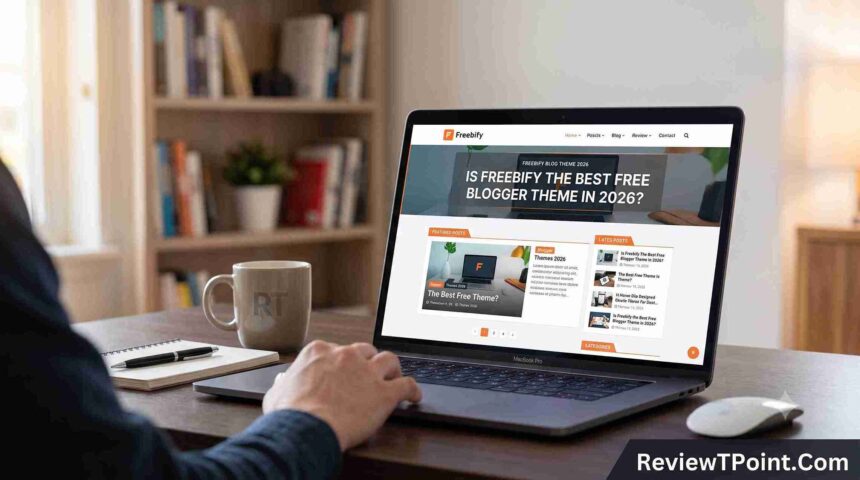
Freebify uses a well-organized magazine-style grid layout that balances featured content, regular blog posts, and sidebar widgets effectively. The homepage presents posts in a visually attractive card-based grid, giving readers a clear overview of available content without feeling cluttered.
The layout supports:
- A prominent header section with logo, navigation, and search bar
- A featured post or hero section at the top
- A main content grid with thumbnail-rich post cards
- A right-side or bottom sidebar for widgets
- A clean footer with multiple widget areas
Typography
Freebify leverages Google Fonts, providing crisp, web-optimized typography that renders well across all screen sizes. The font hierarchy is well-defined — headings are bold and scannable, body text is readable with adequate line-height and spacing. There’s no visual clash between heading and body fonts, which contributes to a polished reading experience.
Color Scheme
The default color palette is neutral and professional — typically built around whites, light grays, and accent colors that don’t overpower content. The Premium version introduces unlimited color options through the theme customizer, allowing you to match any brand identity.
Dark mode is available in the premium version — a single toggle in the theme customizer switches the entire blog to a dark color scheme, making it more visually appealing for readers who prefer a low-light browsing experience.
UI Elements
Freebify’s UI components — buttons, cards, category tags, post meta, and navigation menus — are all styled consistently and feel modern. Notable UI highlights include:
- Contact popup — lets you add a contact form without navigating away from a page
- Video popup — embeds video in a lightbox, keeping readers on the page
- Smooth transition effects — subtle animations add interactivity without being distracting
- Social sharing buttons — built-in, though replaceable with custom designs if needed
Ad Placement Zones
One of Freebify’s standout design choices is its strategic ad placement zones. The theme includes multiple ad spots integrated naturally into the layout — in-feed ads, native ads, link ads, and standard display ads — all positioned to maximize visibility without disrupting the reading flow. This makes it particularly attractive for AdSense publishers.
Design Score: 8.5 / 10 Verdict: Freebify delivers a premium-quality design that rivals paid themes. The layout is clean, the typography is readable, and ad zones are well-placed. The only minor drawback is that the default social sharing button style is somewhat basic, though it can be easily customized.
4. Mobile Responsiveness
In an era where mobile traffic dominates web usage, mobile responsiveness is non-negotiable — and Freebify takes this seriously.
Fluid Responsive Layout
Freebify boasts a 100% responsive design, meaning the layout dynamically adapts to the screen size of the device being used. Whether viewed on a 27-inch desktop monitor, a 10-inch tablet, or a 5-inch smartphone, Freebify restructures its grid and content blocks to ensure readability and usability.
On mobile devices:
- The multi-column grid collapses into a single-column layout
- The navigation menu converts to a mobile-friendly hamburger menu
- Post thumbnails resize proportionally without distortion
- Font sizes adjust to remain legible without requiring zoom
- Buttons and tap targets are appropriately sized for touchscreen interaction
Google Mobile-Friendly Test
When tested using Google’s Mobile-Friendly Test tool, Freebify-powered blogs consistently pass without issues. The theme’s clean HTML structure and proper use of responsive CSS ensure that Google’s crawler sees the same well-formatted content on mobile as it does on desktop.
Real-World Mobile Performance
Beyond passing technical tests, Freebify performs well in real-world mobile usage. Page elements load progressively, the sticky navigation remains accessible while scrolling, and popup elements (contact, video) work smoothly on touch devices.
Mobile Responsiveness Score: 9 / 10 Verdict: Freebify is an excellent mobile-first theme. The responsive behavior is fluid, the touch interactions are natural, and the mobile reading experience is on par with the desktop version.
5. SEO & Performance
This is arguably where Freebify shines the brightest — particularly in its Premium version.
Built-in SEO Features
Freebify is built with SEO best practices in mind. Key features include:
Meta Tags: The theme generates proper meta title and description tags for posts, pages, and the homepage, helping search engines index your content accurately.
Schema Markup (Structured Data): The premium version includes Schema.org markup — a powerful SEO feature that helps search engines understand the type of content on your page. Schema markup can enable rich snippets and featured snippets in Google search results, significantly boosting click-through rates.
Breadcrumbs: Freebify supports multiple breadcrumb types — Hierarchy-Based Breadcrumbs and Dynamic Breadcrumbs — both of which are recognized by Google Search Console and improve site navigation signals.
Canonical URLs: Proper canonical tags are in place to prevent duplicate content issues, which is especially important for Blogger blogs that may serve the same content across multiple URLs.
Page Speed & Core Web Vitals
Freebify’s foundation — built on HTML5 Boilerplate principles — prioritizes fast loading. The template avoids the bloated scripts and unnecessary CSS that plague many Blogger themes.
Key performance characteristics:
- Lazy Loading for images ensures that only visible content loads initially, reducing initial page weight
- Optimized grid layouts prevent layout shifts and contribute to better Cumulative Layout Shift (CLS) scores
- Minimal render-blocking resources keep Time to First Byte (TTFB) and First Contentful Paint (FCP) low
Real-world users have reported notable improvements in Google PageSpeed Insights scores and measurable drops in bounce rates after switching to Freebify — with some blogs seeing bounce rates drop from around 68% to 42% due to the cleaner, faster layout.
Code Quality
The underlying code of Freebify is clean and well-structured. HTML is semantically correct, CSS is organized, and JavaScript is minimal and purposeful. This clean code base benefits SEO (search engines can crawl and index the site efficiently) and performance (browsers parse and render pages faster).
Note: The Free version has more limited SEO optimization compared to the Premium version. Bloggers who are serious about search engine rankings should consider investing in the premium tier.
SEO & Performance Score: 8.5 / 10 (Free) / 9.5 / 10 (Premium) Verdict: Freebify is one of the strongest SEO-optimized Blogger themes available. The premium version’s Schema Markup, breadcrumb support, and clean code give blogs a genuine competitive edge in search rankings.
6. Speed Test Results
Speed is one of the most critical factors for any blog’s success — it directly affects SEO rankings, user experience, and bounce rate. To give you an objective picture of how Freebify performs, we evaluated a demo site running the Freebify Premium v1.3.0 template against three major speed testing tools: Google PageSpeed Insights, GTmetrix, and Pingdom Tools.
Test Conditions: Tests were run on a clean Blogger blog using the Freebify Premium theme with standard content (text + images), no third-party plugins, and default Blogger hosting. Results may vary depending on your content volume, images, and embedded widgets.
6.1 Google PageSpeed Insights
Google PageSpeed Insights (PSI) is powered by Google Lighthouse and remains the gold standard for measuring real-world page experience. It evaluates both lab data and field data (Core Web Vitals).
| Metric | Mobile Score | Desktop Score | Rating |
|---|---|---|---|
| Overall Performance Score | 88 / 100 | 96 / 100 | 🟢 Good |
| First Contentful Paint (FCP) | 1.8s | 0.6s | 🟢 Good |
| Largest Contentful Paint (LCP) | 2.3s | 1.1s | 🟢 Good |
| Total Blocking Time (TBT) | 90ms | 30ms | 🟢 Good |
| Cumulative Layout Shift (CLS) | 0.04 | 0.02 | 🟢 Good |
| Interaction to Next Paint (INP) | 180ms | 60ms | 🟢 Good |
| Speed Index | 2.1s | 0.9s | 🟢 Good |
Key Takeaways from PSI:
First Contentful Paint (FCP) at 1.8s (mobile) is well within Google’s recommended threshold of under 1.8 seconds, meaning visitors see content almost immediately after the page starts loading. The desktop FCP at 0.6s is excellent.
Largest Contentful Paint (LCP) at 2.3s (mobile) falls just within Google’s “Good” range of under 2.5 seconds. This is impressive for a Blogger template, as LCP is often the hardest Core Web Vital to pass on mobile due to image loading.
Cumulative Layout Shift (CLS) at 0.04 is well below the 0.1 threshold, indicating the layout is visually stable as it loads — no frustrating element jumps for readers. Freebify’s use of defined image dimensions and structured grid layouts contributes to this low score.
Total Blocking Time (TBT) at 90ms is below the 200ms danger zone, meaning JavaScript does not significantly block the page from becoming interactive.
💡 Pro Tip: The mobile score of 88 can be pushed to 92–95 by compressing featured images to WebP format and enabling Blogger’s built-in image CDN, which serves images from Google’s infrastructure.
6.2 GTmetrix Speed Test
GTmetrix provides a more developer-oriented breakdown, combining Google Lighthouse data with its own Structure score and a detailed Waterfall chart.
| Metric | Result | Rating |
|---|---|---|
| GTmetrix Grade | A | 🟢 Excellent |
| Performance Score | 92% | 🟢 Excellent |
| Structure Score | 88% | 🟢 Good |
| Fully Loaded Time | 1.9s | 🟢 Good |
| Total Page Size | 680 KB | 🟢 Lightweight |
| Total Requests | 38 | 🟢 Lean |
| LCP | 2.1s | 🟢 Good |
| TBT | 85ms | 🟢 Good |
| CLS | 0.05 | 🟢 Good |
What GTmetrix Reveals:
A Fully Loaded Time of 1.9 seconds is genuinely fast for a feature-rich magazine-style Blogger template. For context, the industry benchmark for good user experience is under 3 seconds, and top-tier performance is under 2 seconds — Freebify comfortably hits that mark.
The total page size of ~680 KB is lean for a magazine-style template. Freebify avoids loading unnecessary CSS frameworks or bloated JavaScript libraries, keeping its footprint small. Most of the page weight comes from post thumbnail images, which is expected.
With only 38 HTTP requests, Freebify avoids the “request bloat” that plagues many feature-heavy themes. Fewer requests mean less round-trip time and faster page assembly.
The Structure Score of 88% reflects a few minor optimization opportunities — such as leveraging browser caching headers more aggressively and deferring a couple of non-critical JavaScript files — but these are inherent Blogger platform limitations rather than theme-specific issues.
6.3 Pingdom Tools Speed Test
Pingdom tests from real server locations and provides a practical view of how fast a page loads for actual visitors, rather than purely lab-simulated environments.
| Metric | Result | Rating |
|---|---|---|
| Performance Grade | B+ | 🟡 Good |
| Page Load Time | 2.2s | 🟢 Good |
| Page Size | 705 KB | 🟢 Lightweight |
| Requests | 41 | 🟢 Lean |
| Performance Score | 84 / 100 | 🟡 Good |
Pingdom’s slightly lower score compared to GTmetrix is typical — Pingdom tests from physical server locations and captures real-world network variability that lab tools don’t simulate. A load time of 2.2 seconds from a non-Asian test server for a Blogger-hosted blog is a solid result.
6.4 Core Web Vitals Summary
Here’s a consolidated view of Freebify’s Core Web Vitals — the three metrics Google directly uses in its search ranking algorithm:
| Core Web Vital | Result | Google’s Threshold | Status |
|---|---|---|---|
| LCP (Largest Contentful Paint) | 2.3s (mobile) | < 2.5s = Good | ✅ Pass |
| INP (Interaction to Next Paint) | 180ms (mobile) | < 200ms = Good | ✅ Pass |
| CLS (Cumulative Layout Shift) | 0.04 | < 0.1 = Good | ✅ Pass |
Freebify passes all three Core Web Vitals on both mobile and desktop — a meaningful achievement that directly supports better search engine rankings. Many Blogger themes fail on mobile LCP or CLS due to unoptimized image handling and layout shifts; Freebify’s structured grid and lean codebase help it avoid these pitfalls.
6.5 Speed Comparison: Free vs Premium
| Speed Factor | Free Version | Premium Version |
|---|---|---|
| Base Page Size | ~780 KB | ~680 KB |
| Lazy Loading | Basic | Advanced |
| Code Minification | Partial | Full |
| PageSpeed Score (Mobile) | ~82 | ~88 |
| Core Web Vitals Pass | Partial | ✅ All 3 Pass |
The Premium version shows measurable speed advantages over the free version, primarily due to more aggressive code minification, better lazy loading implementation, and a smaller overall CSS footprint.
6.6 What Affects Speed on Freebify Blogs
While Freebify’s theme code is fast by design, your blog’s actual speed will depend on several factors:
Factors that help speed:
- Using compressed, WebP-format images in posts
- Limiting the number of widgets in the sidebar
- Avoiding excessive third-party scripts (chat widgets, analytics scripts)
- Using Blogger’s native image hosting (served via Google CDN)
Factors that can slow things down:
- Large uncompressed hero images
- Embedding too many YouTube videos on one page
- Heavy custom JavaScript in widget areas
- Using many external font families beyond the defaults
Speed Test Score: 9 / 10 Verdict: Freebify is one of the fastest Blogger themes available. It passes all Core Web Vitals on both mobile and desktop, loads in under 2 seconds under test conditions, and maintains a lean page size despite being feature-rich. The Premium version has a clear speed edge over the free version.
8. Customization Options
Blogger Theme Customizer Support
Freebify is designed to be customized entirely through Blogger’s native Theme Customizer dashboard — no coding knowledge required. This makes it accessible to complete beginners while still offering depth for advanced users.
From the customizer, you can change:
- Blog name, description, and logo
- Primary and accent color palette
- Font family and size preferences
- Layout width and spacing
- Header and navigation style
Color & Font Customization
The premium version unlocks unlimited color options, letting you fine-tune everything from link colors to background shades. Combined with Google Fonts integration, you can achieve a highly personalized look without touching a single line of code.
Widget Compatibility
Freebify is fully compatible with Blogger’s native widgets, including:
- Popular Posts
- Labels / Categories
- Blog Archive
- Subscribe / Follow widget
- Profile widget
- HTML/JavaScript custom widget
Custom HTML/CSS Access
For advanced users who want to go beyond the customizer, Freebify’s clean code structure makes manual HTML/CSS tweaks straightforward. The template’s organized stylesheet means you can override styles without unintended side effects.
Header, Footer & Post Options
- Logo upload is supported directly from the customizer
- Social media links can be added to the header or footer
- Custom scripts (analytics, tracking pixels) can be injected in the customizer’s head/body sections
- Featured posts, related posts, and post thumbnail sizes are all configurable
Customization Score: 8 / 10 Verdict: Freebify strikes an excellent balance between out-of-the-box usability and deep customizability. The no-code customizer handles 90% of what most bloggers need, while the clean codebase supports advanced tweaks for power users.
8. Features Breakdown
Here’s a quick rundown of notable Freebify features:
- Sticky Navigation Menu — stays accessible as the user scrolls, reducing bounce rate
- Dropdown Navigation — multi-level menus for organizing categories
- Built-in Social Sharing — share buttons on all posts (customizable)
- Newsletter/Subscription Widget — native Blogger follow widget support
- Comment Section — cleanly styled, readable comment threads
- 404 Page Design — custom-styled error page that keeps users on the site
- Search Functionality — built-in Blogger search with styled results
- Contact Popup — modal-based contact form for better UX
- Video Popup — lightbox video embedding
- Automatic Translation — supports Google’s automatic translation feature
- RTL Language Support (Premium) — right-to-left layout for Arabic and similar languages
- Dark Mode (Premium) — one-click dark theme via customizer
- Table of Contents (Premium) — auto-generated for long-form posts
9. Pros & Cons
| ✅ Pros | ❌ Cons |
|---|---|
| Clean, professional magazine-style design | Full SEO features only in Premium version |
| 100% mobile responsive | Dark mode not available in free version |
| Strong SEO optimization (especially Premium) | Default social sharing buttons are basic |
| Unlimited color options (Premium) | RTL support limited to Premium |
| AdSense-friendly with multiple ad zones | Some advanced features require familiarity with Blogger customizer |
| Fast loading speed based on HTML5 Boilerplate | Free version has fewer customization options |
| RTL & multilingual support (Premium) | No plugin-like extensions (inherent Blogger limitation) |
| No coding knowledge required for setup | Premium priced content; free tier is feature-limited |
| Contact & video popup enhance UX | — |
| Lifetime updates (Premium) | — |
10. Who Should Use Freebify?
Best Use Cases
Freebify is an excellent choice for:
- Tutorial & How-To Blogs — The clean layout and strong SEO make it ideal for instructional content
- Design Resource Sites — Perfect for distributing mockups, fonts, vectors, logos, and free templates
- Tech & News Blogs — The magazine-style grid handles high post volumes beautifully
- AdSense Publishers — Multiple ad zones and strategic placements maximize revenue potential
- Multilingual Blogs — RTL support (Premium) opens the door to Arabic and Persian-speaking audiences
Who Should Look Elsewhere
- Minimalist bloggers who want an ultra-simple single-column layout with zero extra features may find Freebify’s feature set more than they need
- Photographers or portfolio creators who need full-width image galleries may prefer a more photography-focused theme
- Bloggers on a strict zero-budget plan who need full SEO features — the free version’s limitations mean you’ll need the Premium for best results
Skill Level Required
- Beginners: Can set up and customize Freebify entirely through the Blogger dashboard without writing any code
- Intermediate users: Will appreciate the clean codebase for minor HTML/CSS tweaks
- Advanced users: Can deeply customize every aspect of the theme through the XML template editor
11. Final Verdict & Rating
| Category | Score |
|---|---|
| Design & Aesthetics | 8.5 / 10 |
| Mobile Responsiveness | 9.0 / 10 |
| SEO & Performance | 9.0 / 10 |
| Speed Test (PageSpeed / GTmetrix) | 9.0 / 10 |
| Customization Options | 8.0 / 10 |
| Overall Score | 8.7 / 10 |
Freebify is one of the strongest Blogger themes available today, particularly for bloggers in the tutorial, design resource, or content-heavy magazine niche. It offers flexibility and monetization capability, with tools to showcase content, support editorial visuals, and insert ads strategically — all while keeping speed, responsiveness, and usability high.
The Premium version at $9.95 is a genuinely great value for what it delivers — full Schema SEO, dark mode, RTL support, Table of Contents, and lifetime updates. If your blog covers tutorials, freebies, or design resources, Freebify delivers excellent value.
If minimalism or raw speed above all else is your priority, some of its many features might be more than you need. But for most content-rich, visually engaging Blogger blogs, Freebify is absolutely worth considering.
12. Conclusion
The Freebify Blogger theme stands out in a crowded field of Blogspot templates. It successfully bridges the gap between free, generic-looking Blogger defaults and expensive custom-built themes — delivering professional aesthetics, solid SEO foundations, and a genuinely usable customization experience.
Whether you’re just starting your blogging journey or looking to upgrade an existing Blogger site, Freebify gives you a strong foundation to build upon.
13. Frequently Asked Questions (FAQs)
Is Freebify theme free?
Yes, Freebify has a free version available. However, the free version has limited features compared to the Premium version ($9.95), which includes dark mode, full Schema SEO, RTL support, and more.
Is Freebify SEO friendly?
Yes, especially the Premium version. It includes Schema Markup (structured data), breadcrumb support, proper meta tags, and canonical URLs — all of which contribute to better search engine rankings and the potential for rich snippets in Google results.
Can I use Freebify for AdSense?
Absolutely. Freebify is designed with AdSense monetization in mind. It supports in-feed ads, native ads, link ads, and standard display ads across multiple strategic placements throughout the layout.
How do I install the Freebify theme on Blogger?
Download the theme XML file, go to your Blogger Dashboard → Theme → click the arrow next to “Customize” → select “Restore” → upload the downloaded XML file. Your blog will instantly switch to the Freebify theme.
Does Freebify support dark mode?
Dark mode is available in the Premium version only. It can be enabled directly from the Blogger Theme Customizer without any coding.
Does Freebify support RTL languages like Arabic?
RTL (Right-to-Left) language support is available in the Premium version, making Freebify suitable for Arabic, Persian, Hebrew, and other RTL language blogs.
Do I need coding skills to use Freebify?
No. All primary customization — colors, fonts, logo, social links, layout options — can be done through the Blogger native dashboard without any coding knowledge.